Reading Answers
How to find what people said in a campaign, read and listen to each answer, and hide or delete one.
Overview
Answers in a campaign's Manage group lists what people said, newest first. Each answer is one person's reply to one prompt. We transcribe a recording, translate it into English, and analyze it as the campaign's Analysis asks. See Analysis.
A typed answer is ready in seconds. A recording takes a minute or two. Answers on their way show where they are and update by themselves.
Everyone with a role can read answers. Editors also hide and delete them.
The list
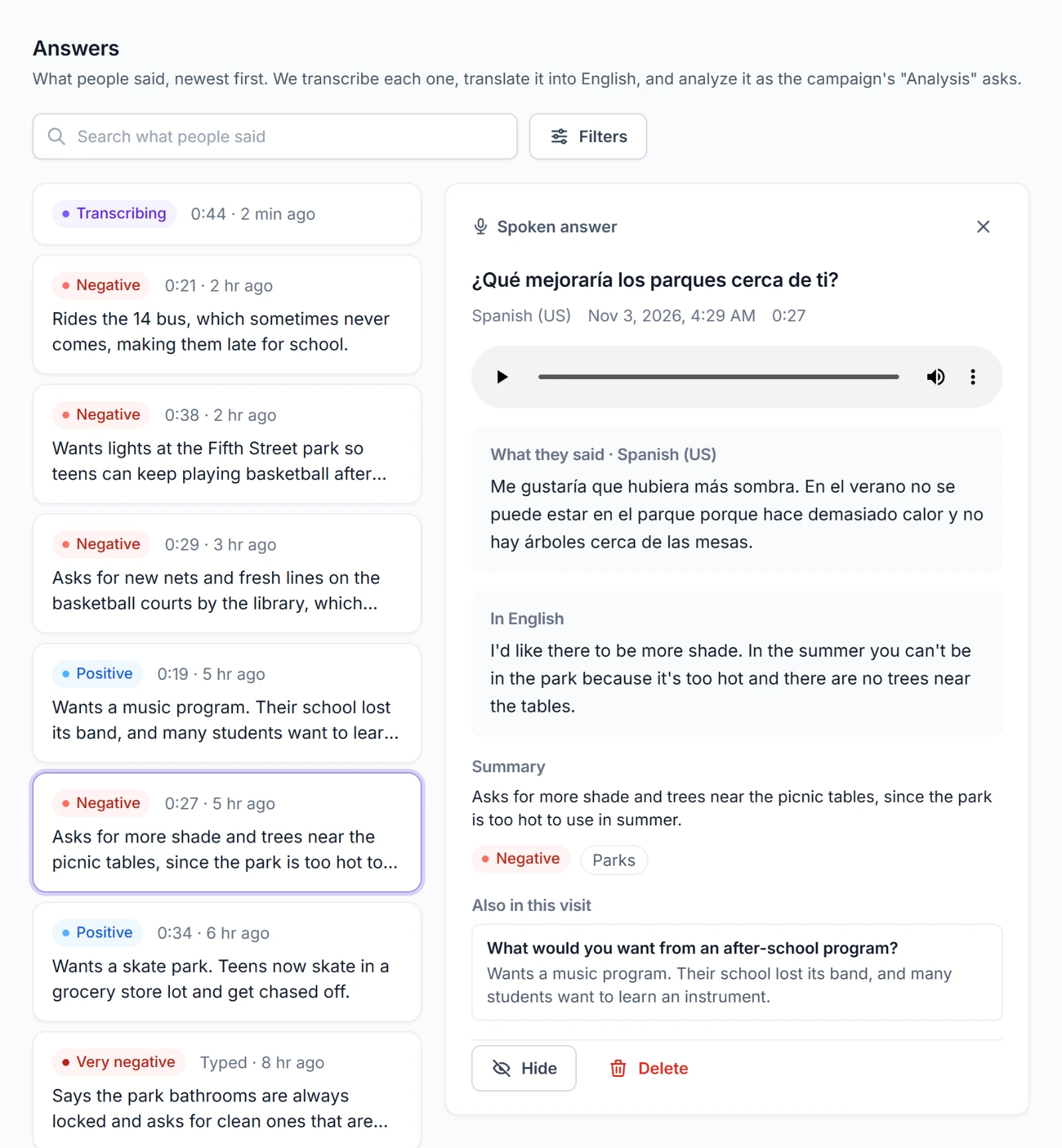
Each card shows:
- its sentiment once it's analyzed, or Transcribing, Analyzing, or Not transcribed
- the recording's length, or Typed
- how long ago it came in, and Hidden if it's hidden
- its summary, or the start of what was said
The list shows 50 answers at a time. Show more answers at the bottom loads the next 50.
Finding answers
Search what people said finds answers by their words, their English, and their summary.
Filters opens the rest:
| Filter | Shows |
|---|---|
| Prompt | The answers to one prompt. A retired prompt is marked (retired). |
| Language | The answers in one language. It shows when the campaign offers more than one. |
| Sentiment | The answers with one sentiment. |
| Topic | The answers tagged with one topic. It shows when the campaign lists topics. |
| Spoken or typed | Recordings only or typed answers only. |
| Stage | Answers On its way, Done, or Not transcribed. |
| Show hidden | Hidden answers along with the rest. |
Each filter in use stands as a chip under the bar. Choose a chip to take its filter off. Clear all takes them all off. The filters and the answer you have open are in the page's address, so a link to the page opens the same view for anyone in your organization.
Charts in Insights open this list already filtered. See Insights.
An answer
Choose a card to open the answer. It opens beside the list on a wide screen and in place of the list on a narrow one.
- The prompt in the language the person read it in, with their language, when they answered, and the recording's length.
- A player for the recording.
- What they said or What they wrote in their language. Where it's in another language, In English sits beside it.
- Summary, the sentiment, and the topics.
- What the link carried: Speaker from
micuser, eachutm_value, and the Network address where the campaign keeps it. See Options you can add to the link. - Also in this visit: the person's other answers from the same visit, so you can read them side by side.
An answer given in Try it says Given in "Try it" by and the editor's name.
When we couldn't transcribe a recording
An answer marked Not transcribed says why:
| Message | What happened |
|---|---|
| The recording has no sound. | The file held nothing to hear. |
| We couldn't read the recording, so we didn't transcribe it. | The file isn't a recording we can read. |
| The recording is longer than its prompt allows, so we didn't transcribe it. | It ran well past the prompt's time limit. |
| We couldn't transcribe the recording. | Transcription failed. |
| We tried several times but couldn't transcribe the recording. | It stayed stuck after several tries. |
Where there's a recording to play, you can still listen to it. A recording with no words in it says We didn't hear any words in this recording.
Hiding and deleting answers
Editors find both at the foot of an open answer.
Hide keeps an answer out of the list, Insights, the summary, and the assistant, and keeps the answer itself. Use it for a test, a mistake, or something you'd rather not count. The answer says who hid it and when. To see hidden answers, turn on Show hidden in Filters, then open one and choose Show it again to count it again.
Delete removes the answer and its recording for good. Delete this answer? asks first, and Delete the answer confirms it. It can't be undone.