Asking Rapport
How to ask Rapport about your network, work with its answers, and save a question for your organization.
Overview
Ask Rapport, in the bottom right corner of every page, opens a chat with Rapport's agent. Ask it about your organization's people and how they connect, such as who is most connected or who lives near a place. Anyone with the data admin or analyst role can ask. The agent sees only what you can see.
The agent knows the page you're on and the person or organization open there. On a network, it knows who is in the middle, the radius, and who you've chosen. It can open a page, put someone in the middle of the network, and highlight people for you. It never changes your records.
Each answer is a table, and it opens in Results at the bottom of the page. Every number says what it counted. The agent tells you, and Results shows it under the answer's name.
The conversation lasts while your browser tab is open. The agent doesn't remember earlier conversations.
What you can ask
Rapport has ready answers to common questions, such as these:
- Who has the most connections?
- Who connects groups that otherwise don't touch?
- How are these two connected?
- Who belongs to both of these?
- Which organizations share the most people with this one?
- Who belongs to the most organizations?
- Who has no connections?
- What clusters does the network fall into?
- Who is near this one or this address?
- Who is inside this ZIP code, county, city, or shape?
- What does this organization's network hold?
Ask in your own words. When none of these fits, the agent writes a question of its own. When that question answers, it offers to save it for your organization. See Saved questions.
To ask about part of an answer, select its rows in Results and ask about the ones you selected.
Places
Questions about places use where people and organizations are on the map, so they count only those whose addresses have been looked up. See The map. Distances are in straight-line miles.
- A ZIP code, county, or city. Give a county or city with its state, such as "ZIP 77002," "Harris County, TX," or "Houston, TX." A city means everyone inside its city limits. Rapport doesn't go by the city in your records.
- A street address that isn't in your records. We look it up for that question. If it's new to us, it counts as one of your organization's lookups for the month.
- A shape you drew on the map. Ask who is inside it. See Drawing a shape.
Results
Results holds each answer as a tab, named by its question with how many rows it has.
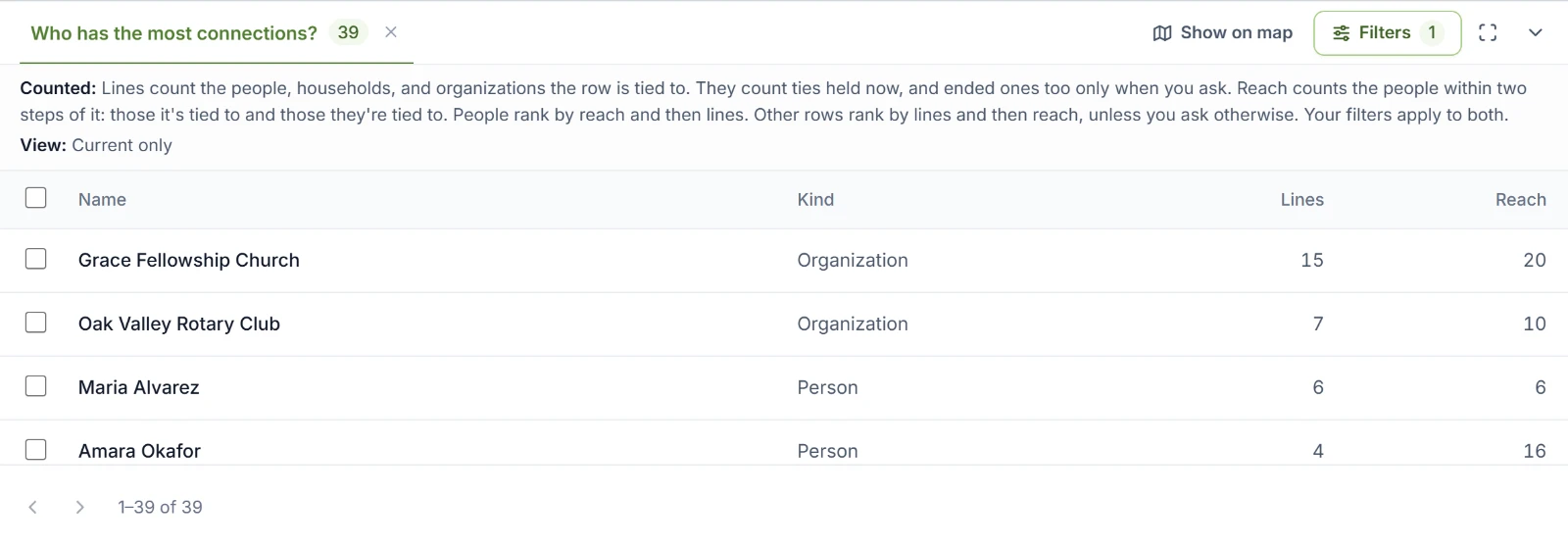
- Counted says what the numbers count.
- View says which filters the answer counted through. It adds "not your view now" when your filters have changed since.
- Choose a column's heading to sort by it. A name opens that person's or organization's page.
- The arrows at the bottom move through the rows.
- Show on map shows the answer's people and organizations on the map. A line above the map names the answer and counts who is on it. Back to the network returns to the network.
- Filters are the same as on the network, and the agent's next question counts through them. See Filters.
- The buttons at the right make Results fill the window, make it small again, and close it to a small Results handle that says how many answers are waiting.
- The x on a tab closes that answer.
The agent can open, sort, and select in Results for you. Your answers last while your browser tab is open. They go when the conversation changes or you sign out.
Saved questions
When the agent writes a question that isn't one of Rapport's own and it answers, the agent offers to save it. Say yes, and the question is kept with a name and a line saying what it answers. Anyone in your organization who sees the people can then ask it again.
Saved questions are listed in Settings, where data admins rename and remove them. See Saved questions.