People and Roles
How to add the people who use Rapport, choose who holds each role, and reset someone's sign-in.
Overview
People and Roles in the sidebar lists the people in your organization who use Rapport, the roles they hold, and how each one signs in. It's for your organization's admins, and only they see it.
These are your own staff. The people your organization knows from its records are on People. See Finding People.
Rapport's admins are your organization's Owners and Admins in the Flourish Dashboard. See Team & Permissions.
The roles
| Role | What it lets someone do |
|---|---|
| No role | Opens Rapport and sees no one until they have a role. |
| Data admin | Sees the people your organization knows, reviews their duplicates, and merges them. |
| Analyst | Sees the people your organization knows and each one's page. |
| Admin | Adds people, chooses who holds each role, and changes the organization's settings. |
Data admins and analysts both see how people connect and can ask Rapport about them. Data admins also rename and remove saved questions and set the organization's default view. See Settings.
Someone can hold more than one role. An admin who should see the people needs the data admin or analyst role, too. What each role does, at the bottom of the page, says the same.
Making someone an admin here makes them an Admin of your organization in the Flourish Dashboard, too.
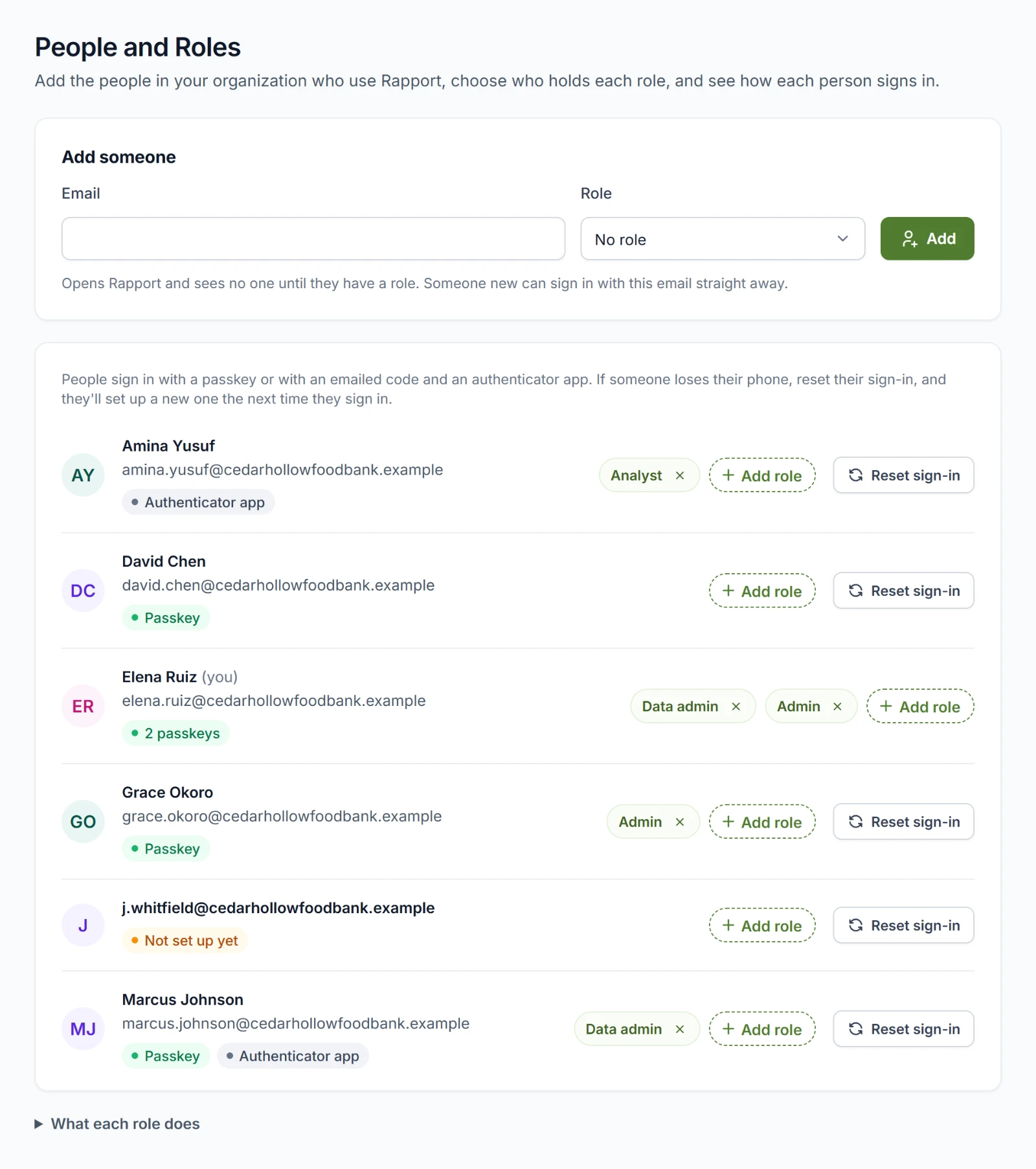
Adding someone
- Under Add someone, enter their Email.
- Choose a Role: No role, Data admin, Analyst, or Admin. The line below says what the role lets them do.
- Choose Add.
They can sign in with that email address straight away. Someone new to Flourish signs in on Flourish's sign-in page and sets up a passkey or an authenticator app the first time.
Giving and taking roles
- To give a role, choose Add role on the person's row, then the role. Each choice says what it lets them do.
- To take a role away, choose the × on its chip and confirm. Taking your own role away also warns you that you may lose access to parts of the organization.
If Rapport refuses a change, the reason shows in that person's row. An organization always keeps at least one admin, and an Owner's admin role changes only in the Flourish Dashboard.
Giving yourself a role
An admin without the data admin or analyst role sees See your organization's people yourself at the top of People and Roles and on People. Choose Data admin or Analyst there to give it to yourself.
How each person signs in
Each row shows how that person signs in: how many passkeys they have, whether they use an authenticator app, or Not set up yet.
Resetting someone's sign-in
When someone loses the phone they sign in with, reset their sign-in:
- Choose Reset sign-in on their row.
- Read what happens and choose Reset sign-in again.
Rapport removes their passkeys and authenticator app and signs them out of every Flourish app. The next time they sign in, they get an emailed code and set up a new passkey or authenticator app. We email them to say you reset it.
You can't reset your own sign-in here. Ask another admin.