Finding People
How to find a person, household, or organization your organization knows and read what your records say about them.
Overview
People, Households, and Organizations in the sidebar list everyone your organization knows from its Salesforce records. Each one has a page that shows their records side by side. You need the data admin or analyst role to see them. See People and Roles.
We copy your Salesforce records each night, so the lists and pages show them as they were at the last copy. Rapport copies what its pages show, such as names, email addresses, and phone numbers. It never copies notes, descriptions, or anything about the services your clients receive.
The lists
Each list shows 50 at a time. Show more, at the bottom, shows the next 50. People are sorted by last name.
| List | Columns |
|---|---|
| People | Name, Email, Phone, and Organization or household |
| Households | Name and City |
| Organizations | Name, Phone, Website, and City |
The lists follow how your Salesforce keeps its records. With Nonprofit Success Pack, there are People, Households, and Organizations. Without it, there are People and Organizations. A list is about the person or organization, not the kind of Salesforce record, so a Lead is on People beside the Contacts.
Searching
Type in Search by name, email, or phone. The search finds:
- A name from the start of any of its words. "alv" finds Luis, Maria, and Sofia Alvarez.
- An email address from its start.
- A phone number by its digits, however it's written. "2013344" finds (555) 201-3344.
The line beside the box says how many match. When some match in another list, it says so, such as "Also 1 household." Choose it to see them there.
A person's page
Choose someone in a list to open their page.
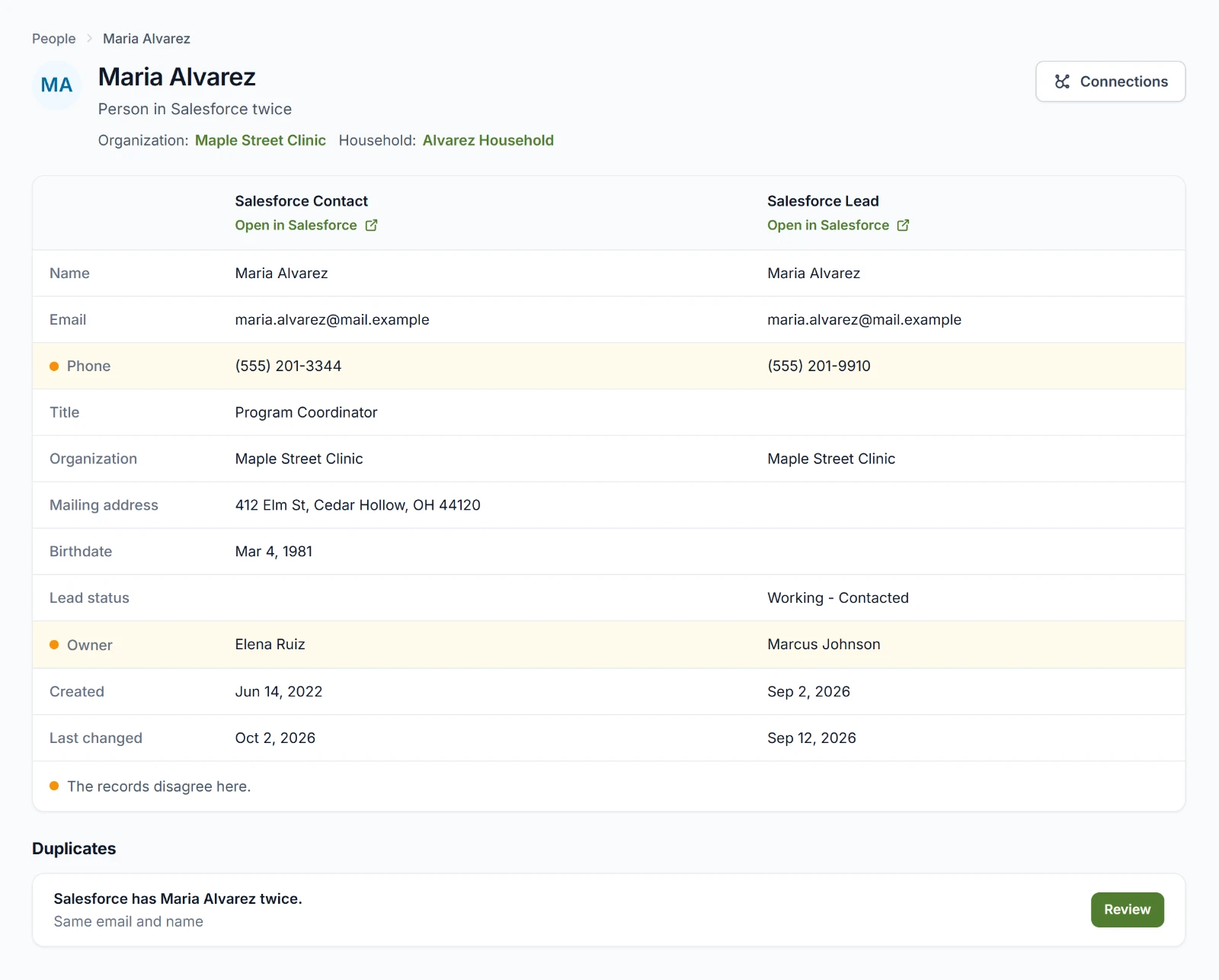
The page shows each of their records, headed by what it is in Salesforce, such as Salesforce Contact or Salesforce Lead. Open in Salesforce opens the record there in a new tab.
Most people have one record, so their page is one card. When Salesforce holds someone more than once, the line under their name says so, such as Person in Salesforce twice, and their records sit side by side, a column each. An orange dot marks a field where the records disagree. On a phone, the records come one after another.
A person's page shows their names, email addresses, phone numbers, birthdate, organization, and household. It also shows their mailing address, title, owner in Salesforce, and when each record was created and last changed. A Lead shows its status, too.
Their organization and household, under their name, open those pages. Connections, at the top right, opens the network around them. See Connections.
Duplicates on a page
Data admins see Duplicates on a page when its records may be duplicates:
| What it says | What it means | Buttons |
|---|---|---|
| Salesforce has Maria Alvarez twice. | We're certain these records are the same person. | Review |
| Possibly the same as someone else | They may be the same person. Their name opens their page. | Review and Not the same |
| Not the same as someone else | A data admin marked them as different. | Take back |
Review opens the review. See Reviewing a group.
An organization's or a household's page
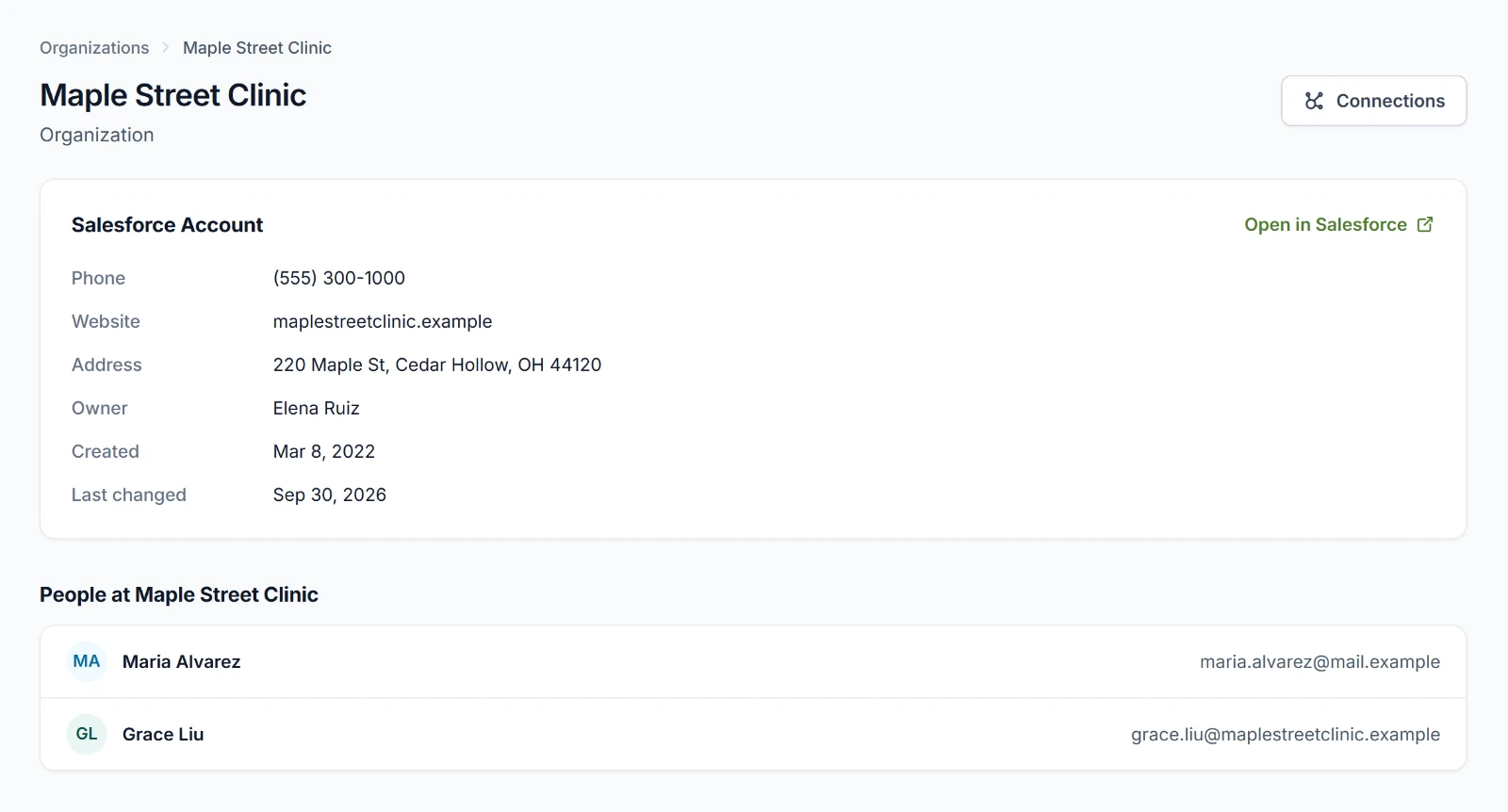
An organization's page shows its phone, website, address, owner, and when it was created and last changed. A household's page shows the same. Below the record, an organization's page lists People at the organization, and a household's lists its Members. Choose someone to open their page. When there are many, the page shows the first ones and says how many there are in all.
When a page isn't there
We couldn't find this record means someone may have merged or deleted it in Salesforce since the last copy.